
How to Manage and Prevent EUC Risks




The Menu button provides access to the individual sections.

The Home button at the end of each section takes you to the start of the course.

The Resources button provides a list of useful links.

The Switch Language button lets you switch to a different language.

The Close button ends your training session and closes the course window.
If you are accessing the course from a personal device directly over the Internet (outside of the Citi network), some links may not work if they link to content within Citi’s network. This will not impact your ability to complete the course.

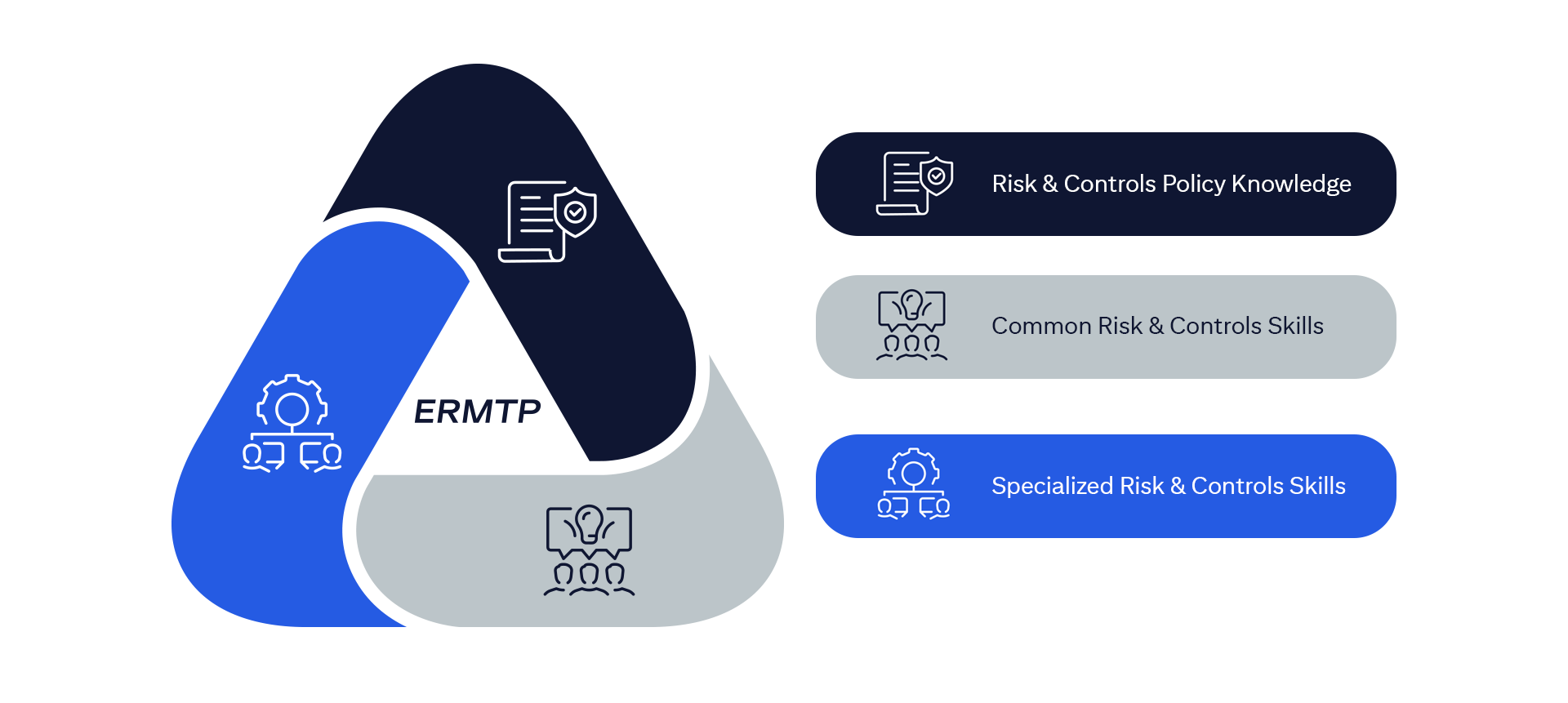
The ERMF establishes an overarching, integrated, and consistent approach to risk management firm wide.
The ERMF has four pillars, as outlined in the following diagram.
Please note: To better understand how Citi manages certain risks, this training will specifically focus on Control within Pillar 3 (Risk Management) of the ERMF. The remaining pillars are addressed in other ERMTP training programs.
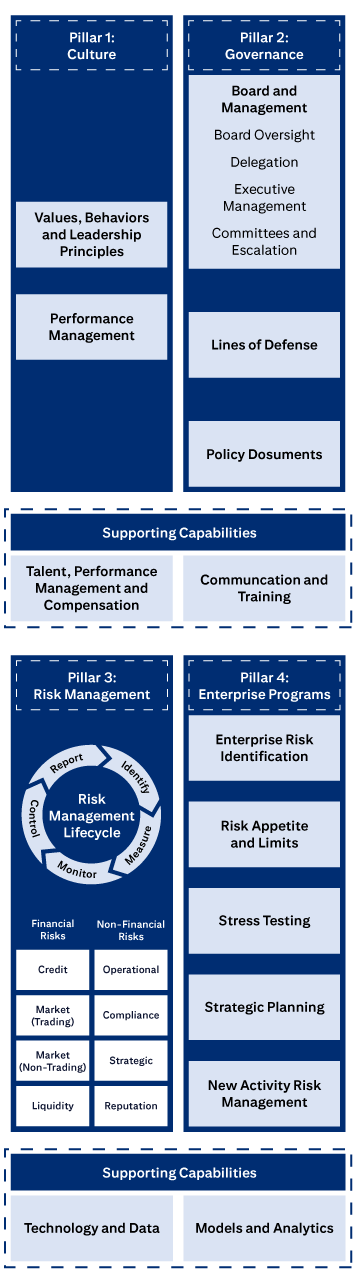
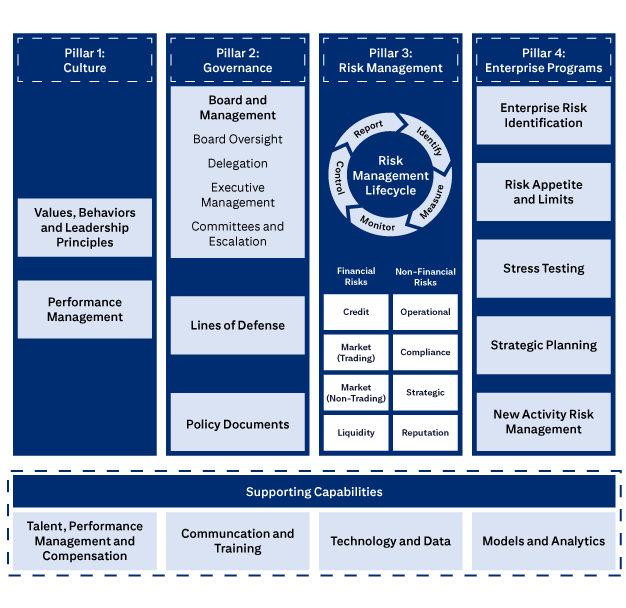
The four pillars of Citi’s ERM Framework.
Pillar 1: Culture includes Values, Behaviors and Leadership Principles, and Performance Management
Pillar 2: Governance includes Board and Management, Board Oversight, Delegation, Executive Management, Committees and Escalation, Lines of Defense, and Policies, Standards and Procedures.
Pillar 3: Risk Management covers the Risk Management Lifecycle (Identify, Measure, Monitor, Control, Report), Financial Risks (Credit, Market (Trading), Market (Non-Trading), Liquidity), and Non-Financial Risks (Operational, Compliance, Strategic, Reputation).
Pillar 4: Enterprise Programs covers Enterprise Risk Identification, Risk Appetite and Limits, Stress Testing, Strategic Planning, and New Activities Approval.
Supporting Capabilities are: Talent, Performance Management and Compensation; Communication and Training; Technology and Data; and Models and Analytics.






EUC tools introduce risks to the organization.
Although EUCs can enhance efficiency, they may also pose risks if not properly managed. In cases like Jared’s, Citi employees may create EUCs when approved Citi technology solutions are not available.
Without appropriate controls, EUCs can put Citi at risk of data breaches and loss or corruption that could cause harm to our firm or our clients.
To proceed, select each button to reveal the impacts of these risks.

Data Integrity
EUCs may contain inaccurate or outdated data, impacting financial and regulatory reporting or critical Citi Applications.

Business Processes Disruptions
An error in EUC could disrupt the approval of a transaction or a key operational process.

Compliance Issues
EUCs may not fully adhere to Citi's IT Security Standards including critical policies such as but not limited to Technology, Cyber Security, Data Privacy, and Cross Border, thereby increasing the potential risk of data breaches.




As risk managers, Citi staff are responsible for reducing reliance on EUCs in Citi’s business processes. Before creating a new EUC or continuing to use an existing one, consider restructuring the process or consider IT-approved alternatives to eliminate or reduce risk.
Examples of IT-approved alternative solutions are IT-enabled Smart Solution (ITeSS) or a Citi Core IT system technology.
To proceed, select each possible alternative to learn more.
Change or modification of the business processes resulting in elimination of the EUC.
go to next button
Check if existing Citi systems might already offer the functionality you need or if a system can be enhanced.
go to next button
An ITeSS is created by an end-user in collaboration with Business and Function IT using approved ITeSS software on a Citigroup Systems Inventory (CSI) registered platform compliant with the ITeSS Standard.
ITeSS have higher levels of controls and oversight from IT, making them a safer alternative to EUCs.
Identification
Use the EUC and ITeSS Decision Tree to identify if a tool is an EUC.
This tool guides you through a series of questions to classify the tool accurately.
Note: The Decision Tree can also identify whether a tool is an ITeSS.
For this training, we are using the EUC and ITeSS Decision Tree for identifying EUCs. You can access the tree on the EUC & ITeSS Decision Tree and Quick Reference Guide.
Pre-Creation
Perform sufficient pre-creation due diligence prior to creating new EUCs.

If the tool is identified as an EUC, register it in the EUC Inventory Tool.
This helps Citi track and manage potential risks associated with EUCs across the organization.

Assess the risks associated with the EUC. Risk Assessment classifications are Critical, High, Medium and Low Risk EUC.

Ensure the EUC has appropriate controls to mitigate potential negative impacts on data, processes, and compliance (e.g., access and entitlement control, data integrity, and version controls.)

Consider IT-approved alternatives to EUCs that help eliminate or reduce risk as covered in the Reduce Reliance on EUCs section.









Jared developed a spreadsheet that contained Logic (not controlled by an Information Technology approved process) for the month-end report, which then was uploaded to a Citi system.
What tool would this be considered?
Select the best response from the four options and then select Submit.
Please use the Space key only when selecting a radio option with the keyboard. The Enter key is not fully supported. If the Enter key has been used to select a radio option, please use the Escape key. Then you will be able to use the Space key again to select a radio option.
The tool is considered an EUC because it has EUC criteria such as: developed by an end user that contains Logic, not controlled by an Information Technology approved process, supports a regular, repeated, business process, and is used to upload to Authorized Data Sources (SoR/AR).
The tool is considered an EUC because it has EUC criteria such as: developed by an end user that contains Logic, not controlled by an Information Technology approved process, supports a regular, repeated, business process, and is used to upload to Authorized Data Sources (SoR/AR).
The tool is considered an EUC because it has EUC criteria such as: developed by an end user that contains Logic, not controlled by an Information Technology approved process, supports a regular, repeated, business process, and is used to upload to Authorized Data Sources (SoR/AR).
That answer is correct.
The tool is considered an EUC because it has EUC criteria such as: developed by an end user that contains Logic, not controlled by an Information Technology approved process, supports a regular, repeated, business process, and is used to upload to Authorized Data Sources (SoR/AR).
That answer is not correct.
Refer to the What is End User Computing (EUC)? section.
That answer is not correct.
Refer to the What is End User Computing (EUC)? section.
Which of the following are solutions to reduce the risk associated with EUCs?
Select the best response from the four options and then select Submit.
Please use the Space key only when selecting a radio option with the keyboard. The Enter key is not fully supported. If the Enter key has been used to select a radio option, please use the Escape key. Then you will be able to use the Space key again to select a radio option.
Solutions to reduce the risk associated with EUCs include Core IT Systems, IT-enabled Smart Solutions and Process Re-engineering which provide higher levels of controls, making them a safer alternative to EUCs.
Solutions to reduce the risk associated with EUCs include Core IT Systems, IT-enabled Smart Solutions and Process Re-engineering which provide higher levels of controls, making them a safer alternative to EUCs.
Solutions to reduce the risk associated with EUCs include Core IT Systems, IT-enabled Smart Solutions and Process Re-engineering which provide higher levels of controls, making them a safer alternative to EUCs.
That answer is correct.
Solutions to reduce the risk associated with EUCs include Core IT Systems, IT-enabled Smart Solutions and Process Re-engineering which provide higher levels of controls, making them a safer alternative to EUCs.
That answer is not correct.
Refer to the How to Reduce EUC Risk section.
That answer is not correct.
Refer to the How to Reduce EUC Risk section.
Which of the following is NOT a risk associated with End User Computing (EUC) tools?
Select the best response from the four options and then select Submit.
Please use the Space key only when selecting a radio option with the keyboard. The Enter key is not fully supported. If the Enter key has been used to select a radio option, please use the Escape key. Then you will be able to use the Space key again to select a radio option.
Physical security is not a risk associated with EUC tools. End user computing is subject to the risks of impact on data integrity, business process disruptions, and compliance issues (not adhering to Citi IT’s Security Standards).
Physical security is not a risk associated with EUC tools. End user computing is subject to the risks of impact on data integrity, business process disruptions, and compliance issues (not adhering to Citi IT’s Security Standards).
Physical security is not a risk associated with EUC tools. End user computing is subject to the risks of impact on data integrity, business process disruptions, and compliance issues (not adhering to Citi IT’s Security Standards).
That answer is correct.
Physical security is not a risk associated with EUC tools. End user computing is subject to the risks of impact on data integrity, business process disruptions, and compliance issues (not adhering to Citi IT’s Security Standards).
That answer is not correct.
Refer to the What is End User Computing (EUC)? section.
That answer is not correct.
Refer to the What is End User Computing (EUC)? section.
What resource can assist you to identify if you have an EUC?
Select the best response from the four options and then select Submit.
Please use the Space key only when selecting a radio option with the keyboard. The Enter key is not fully supported. If the Enter key has been used to select a radio option, please use the Escape key. Then you will be able to use the Space key again to select a radio option.
EUC and ITeSS Decision Tree is a series of questions and criteria used to determine if a tool is an EUC or ITeSS.
EUC and ITeSS Decision Tree is a series of questions and criteria used to determine if a tool is an EUC or ITeSS.
EUC and ITeSS Decision Tree is a series of questions and criteria used to determine if a tool is an EUC or ITeSS.
That answer is correct.
EUC and ITeSS Decision Tree is a series of questions and criteria used to determine if a tool is an EUC or ITeSS.
That answer is not correct.
Refer to the How to Reduce EUC Risk section.
That answer is not correct.
Refer to the How to Reduce EUC Risk section.
Identify, Register and Risk Assess are the first 3 responsibilities performed when an EUC is discovered. What are the next responsibilities?
Select the best response from the four options and then select Submit.
Please use the Space key only when selecting a radio option with the keyboard. The Enter key is not fully supported. If the Enter key has been used to select a radio option, please use the Escape key. Then you will be able to use the Space key again to select a radio option.
When an EUC is discovered, your responsibilities as risk managers are to follow the steps in the EUC lifecycle which includes identification and pre-creation, registration, risk assessment, control implementation and risk reduction.
When an EUC is discovered, your responsibilities as risk managers are to follow the steps in the EUC lifecycle which includes identification and pre-creation, registration, risk assessment, control implementation and risk reduction.
When an EUC is discovered, your responsibilities as risk managers are to follow the steps in the EUC lifecycle which includes identification and pre-creation, registration, risk assessment, control implementation and risk reduction.
That answer is correct.
When an EUC is discovered, your responsibilities as risk managers are to follow the steps in the EUC lifecycle which includes identification and pre-creation, registration, risk assessment, control implementation and risk reduction.
That answer is not correct.
Refer to the How to Reduce Risk section.
That answer is not correct.
Refer to the How to Reduce Risk section.


go to close menu button
go to close button